Ulead Software Supports VR Format Using Panasonic DVD Multi Drive
February 26, 2003
 Torrance, CA - Ulead Systems and Panasonic Industrial are teaming up to offer video editing/DVD authoring products that can be used to read, write and edit video created in the Video Recording (VR) format.
The companies announced three of Ulead’s video editing/DVD authoring products can now be used with Panasonic's OEM DVD Multi drive (Model SW-9571-CYY) to read, edit and write video created in the Video Recording (VR) format.
Ulead DVD MovieFactory 2, VideoStudio 7, and MediaStudio Pro 7 provide "on-disc" editing for VR media that lets users edit directly on a disc to save time and conserve valuable hard disk space. There are no current plans to extend the compatibility to DVD Workshop.
With these VR-enabled products, OEMs can now give consumers who own
a DVD-RAM/R camcorder or DVD set top recorder the tools they need to edit home videos, create DVDs and watch their finished movies on a variety of entertainment devices, the copmanies describe.
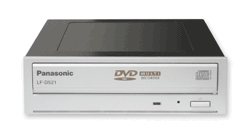
With read/write support for all recordable DVD formats approved by the DVD Forum (DVD-RAM/R/RW) and read/write support for CD-R/RW discs, the DVD Multi drive (Panasonic D521 pictured) provides users with the convenience of being able to choose the format and capacity that best meets their needs.
When combined with Ulead's VR-enabled video editing software, DVD Multi drive users can also realize the benefits of sharing content with other entertainment devices. Consumers who own DVD-RAM/R camcorders or DVD set top recorders that support the VR format can edit and write video back to the VR format or convert the video file to a DVD-video format (DVD-R/RW or VCD discs) for more viewing options.
At the same time, users can save time and space by editing directly on the disc, bypassing the hard drive altogether.
Videos can be captured on low-cost, write-once DVD-R General media for playback by virtually anyone with a DVD player. When a rewriteable DVD-RAM disc is selected, Ulead software's "on-disc" VR editing tools allow users to add and trim video clips and edit playlists directly on the disc. Videos can be edited and burned to the same DVD-RAM disc up to 100,000 times without loss of quality. With DVD-RAM's random access capabilities, users can jump to a specific video frame almost instantly for editing or playback.
Ulead end-to-end video editing and authoring solutions with VR support include:
DVD MovieFactory 2 provides home and office users with an affordable and intuitive tool for capturing, editing and sharing high-quality videos as well as digital image slideshows on DVDs and CDs complete with music, text and captions.
VideoStudio 7 is a complete solution for real-time video capture, edit and output and includes a step-by-step video editing tutorial. A powerful new DVD authoring tool enables users to create sophisticated DVDs with multiple videos, dual layer menus, and first play video clips.
MediaStudio Pro 7 is a complete digital video post-production suite designed
for professional content developers and corporate marketing departments. With
Version 7.0, MediaStudio Pro now offers software-only, real-time editing, display and output features that outperform other professional non-linear video editing software solutions.
The VR format was created by the DVD Forum to bring the familiar functionality
of VCRs to video editing. Unlike the DVD-Video format, the VR format allows users to insert a video segment anywhere on a DVD-RAM or -RW disc, just as they would with a VHS tape. This is one of the key reasons the VR format is being used by major Consumer Electronics manufacturers for their next-generation set-top recorders and camcorders.
The VR recording format, or -VR format, is what is used on DVD-RAM discs. There are camcorders that record directly to DVD-RAM discs (such as Hitachi’s DVD camcorders) in the -VR format, and there are DVD video recorders that support the -VR format.
However, there are very few software programs in the market that support the -VR
format. So those using camcorders that record directly to DVD or who are recording their favorite TV programs on a DVD video recorder (that supports the -VR format) have very few ways of editing this material. Now they have a way of editing their video in the -VR format or converting it to another format (DVD-R or DVD-RW) so that they can watch it on other devices -- such as a regular DVD player that supports the DVD-R and DVD-RW.
(The DVD+RW Real Time Video Format, also known as DVD+VR, is the video recording format stipulated by the DVD+RW Alliance, and supported by a great number of DVD+RW hardware and software manufacturers, such as Phillips and Sonic.)
The Panasonic DVD Multi drive provides write speeds of 2x for 4.7GB DVD-RAM and DVD-R General (equivalent to 18x CD performance) and 1x for DVD-RW media. Smaller files can be stored on 700MB CD-Rs at up to 12x speed or on CD-RW discs at up to 8x speed.
Pricing and Availability
DVD MovieFactory 2 is currently available in North American retail stores, catalogs and online stores for an estimated street price of $49.95, while VideoStudio 7 will be available in mid-February for an estimated street price of $99. MediaStudio Pro7 will be available in March 2003 for an estimated street price of $495.
Panasonic's DVD Multi drive is available for both retail and OEM applications.
Panasonic Industrial Company offers the SW-9571-CYY DVD Multi Drive to OEMs with volume pricing.
For more information, visit
www.ulead.com
or
www.panasonic.com/oemdvd-ram
# # #
For a listing of all the WEVA News Stories...
Click Here |



