JVC Offers New Pro DV Editing VTR
February 07, 2003
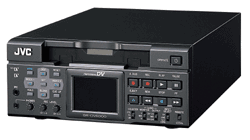 Wayne, NJ - At a press conference during which several new products were unveiled, JVC Professional Products Company introduced the BR-DV6000, a new Professional DV editing recorder and its companion MPEG 4 network card, the SA-DV6000.
Designed specifically to function within a non-linear editing system, the BR-DV6000 is an ideal spooler and flexible, easy-to-use frame-accurate editing machine with a variety of interfaces RS-422, RS-232, JVC Bus and IEEE1394, the manufacturer describes. It provides powerful capabilities such as FWD and REV variable tracking playback and insert/editing that allow for smooth editing of any part of any project. The BR-DV6000 has the flexibility to perform assemble edits too!
The BR- DV6000 has a monitor right on the front panel with a tri-mode display that allows the user to selectively view video with TC, audio level meter, tape remain, mode and other useful data superimposed. It features PAL/ NTSC recording and playback, DVCAM playback ability and a wide range of options including a network board, making it the right choice for professional studio needs. What's more, the BR-DV6000 has optional XLR audio inputs for added flexibility.
In addition to a vast array of editing necessities, the BR-DV6000 can record and playback in NTSC/PAL, so it can work easily with tapes from around the world.
Optional Network Card Allows for Video over IP and Memory Card Recording
By adding the optional SA-DV6000 network card, a new era of connectivity is unleashed. With the network card installed, the BR-DV6000U can create MPEG-4 files and store them on a plug-in PCMCIA Compact Flash memory card, or stream video over the Internet. The card also contains a built-in FTP server and control software so that the recorder can be started and controlled remotely (via any web browser) and then the resulting files downloaded to the client.
New products are scheduled for delivery in May 2003.
For more information, visit
http://pro.jvc.com
# # #
For a listing of all the WEVA News Stories...
Click Here |



