Apple Adds Pro Features to iMovie HD 6 and iDVD 6
January 13, 2006
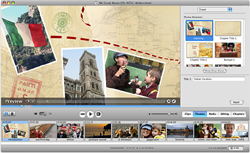 San Francisco, CA - Apple's new iMovie HD 6 and iDVD 6 have a host of new features that let videographers create a cinematic look to their productions.
New iMovie HD 6 Effects
iMovie HD 6 features include real-time Core Video effects that can be previewed without rendering. Titling has been improved with text effects. The upgraded program includes sound effects and audio enhancement tools. Under the new Themes tab you’ll find five new iMovie themes to kick off your next movie project: Travel, Road Trip, Pass Through, Reflection White, and Reflection Black
Mac OS X Core Video technology lets iMovie use your video card’s graphics processing unit to deliver hardware acceleration. With most Mac systems, that means you can preview effects immediately.
Once you find the perfect effect — and iMovie HD 6 offers thirty new effects from which to choose — iMovie renders in the background (its performance accelerated by your Mac’s processor), letting you get on with your other editing chores.
You can edit titles in iMovie as many times as you’d like. If you’re not completely thrilled with a title effect you’ve created, try something else on for size. Experiment. Be fearless. Using iMovie’s new tools, you can create fantastic titles and fabricate truly engaging text effects for your movie projects. And all of the titling action unfolds right before your eyes. No waiting for effects to render. No tiny preview window through which to guesstimate the final results. In iMovie, you see titling effects in real time in the main editing window.
iMovie HD 6 now packs eight new audio effects — all based on Mac OS X Core Audio — that deliver new tools for enhancing the audio in your movie projects.
Take, for example, the new noise reducer. As anyone who has shot video probably knows, the built-in microphone on some camcorders seems to record camera noise and wind (among other ambient sounds) with almost exquisite acuity. Now you can use the noise reducer to virtually eliminate such intrusive sounds. iMovie now lets you sweeten sounds with its built-in graphics equalizer or by using such new audio effects as reverb, delay, pitch change, high pass, low pass, and band pass. And, thanks to the iLife media browser, you have immediate access to sound files from GarageBand. Take note, for example, of the 50 jingles and other sound effects you can add to your movie’s soundtrack.
iMovie lets you open multiple projects at the same time. It lets you copy and paste or drag and drop video clips, audio clips, and photos from one project into another. It doesn’t even have to be “different” movie projects either. With iMovie, you can open multiple saved versions of the same project. With, for example, two versions of the same project open, you can queue up different video effects — they’re lightning fast in iMovie — or different transitions between two scenes and make immediate full-screen comparisons.
To create Podcasts, iMovie HD 6 teams up with iWeb, the newest member of the iLife suite, to help you share your movies over the Internet in exciting new ways. iMovie includes tools that make it easy to add chapter markers (for easy podcast navigation) and incorporate live URLs (for linking them elsewhere on the web, including the iTunes Music Store). In addition, according to Apple, iMovie automatically formats your video for optimal viewing on the Internet — and iPod — using H.264 QuickTime compression.
New Themes Included in iDVD 6
There are 10 new Apple-designed themes in iDVD, five of which are made to match iMovie themes — and all of them are available in both widescreen (16:9) and standard (4:3) formats. Each theme is a family of a three coordinated menus: a main menu, a chapter menu for scene selection, and an extras menu for slideshows and other content.
Each menu in the theme has one or more drop zones with a placeholder image. Simply drag a movie or photo into a drop zone. It automatically becomes part of the menu, inheriting the traits of that drop zone. And you get a professionally designed DVD with themed menus customized with your own DVD content.
For more information on iMovie HD 6 and iMovie DVD 6 go to:
Apple iLife '06
# # #
For a listing of all the Industry News Stories...
Click Here
|



