Panasonic Answers Key Questions About New HVX200
January 12, 2006
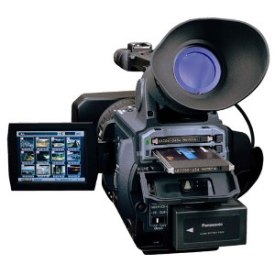 Secaucus, NJ - With the new release of Panasonic’s high-definition AG-HVX200 camcorder ($5,995 list), the manufacturer took time yesterday to answer several technical questions about the new HD unit in an updated FAQ format. Answers from the company appear below.
To see an instant WEVA News-Video clip of the AG-HVX200 Click Here
Is the HVX200 16:9 or 4:3?
The HVX200 has 16:9 native imagers, and it is capable of recording 4:3 video in any of the standard definition modes.
What signals does the HVX200 record?
This camera handles standard-definition in 3 modes: DV and DVCPRO (which are 25 Mbps) and DVCPRO50, which as the name implies, is 50 Mbps, which is also 4:2:2 and has been compared favorably with DigiBeta. It also handles DVCPRO HD high definition at 100 Mbps in 1080i or 720p, recording onto P2 cards.
How is DVCPRO HD different than other HD formats?
There are several HD formats in the industry, namely D-5 HD, HDCAM, HDV and others that can be classified as either an intermediate codec, like one that may be used in the editing domain. DVCPRO HD’s main characteristics are 100 Mbps, frame independent resolution (intraframe recording), 4:2:2 color sampling, and the use of metal particle tape or solid-state memory P2 cards.
What are the benefits of solid-state technology?
Because solid-state recording does away with the parts that are found on traditional tape mechanisms, it has a quiet operation; is virtually maintenance-free; and can be used in extreme and harsh environments.
What frame rates does the HVX200 support?
In 720p mode this camera handles: 12, 18, 20, 22, 24, 26, 30, 32, 36, 48, 60 fps.
What signals and frame rates does the HVX200 support on MiniDV tape?
While recording with the tape drive portion of the camera, you record in 25Mbps Mini-DV mode and in 30 frames per second. 24p and 24pA are available in NTSC models. You can also record variable frame rate footage in 720p mode and internally dub this footage to DV, offering a unique function and effect to your DV productions.
How does the HVX200 record 24P?
It shoots every frame as a progressive frame, so it is true 24P (more accurately known as 23.98 fps). In most recording modes, duplicate frames are added in a 2:3 or a 2:3:3:2 pull-down cadence and the progressive frames are divided into two fields in order to conform to existing interlace 29.97 formats. The 2:3 mode follows all of the conventions of film to tape transfer, so that the recorded material can be treated as a film transfer or in the 2:3:3:2 mode it can be extracted for 24 frame editing. In the 720p "Native Capture" mode only flagged frames are captured with 23.98 time code; these files are directly compatible with a 720p 24-frame timeline, and require only 40% of the storage capacity of 720p 60 fps or 1080i HD recording.
Can I use the HVX200 as a MiniDV VTR source?
Using cameras as a VTR source is possible, but if this is a function that you wish to do all of the time it is recommended that you purchase a VTR for this purpose.
Can I record HD directly to the Focus Enhancements' portable FireStore drive, and how much HD record time will that portable source provide?
Yes. The FS-100 from Focus Enhancements will give 90-100 minutes of high-definition content in 720p or 1080i modes. In DVCPRO50 it will record 200 minutes, and in DV or DVCPRO it will offer 400 minutes.
What’s inside a P2 card?
There are four error-free, 20MB transfer speed SD Memory Cards, a printed circuit board, LSI computer controllers to allow for maximum data speed, cardbus connectors and several clamping plates and a die casting for protection.
How much recording time do I get on a P2 card?
It will depend on what mode you are recording in. For DVCPRO it is 4 minutes per GB; in DVCPRO50, it is 2 minutes per GB; in DVCPRO HD 720p it is 1 minute per GB, and in DVCPRO HD 1080i it is 1 minute per GB. Using the 720p Native Capture mode, only the flagged frames are recorded so the running time will depend on the frame rate (just like film). A rule of thumb in this mode would be to treat 1GB as 100 feet of 16mm film or 250 feet of 35mm film. For example, running an 8GB card at 24P in this mode will give you about 20 minutes per card of 24P HD footage. Or more simply, if shooting 720/24p, you would get 2½ minutes per GB.
What sizes of P2 cards are available?
Currently there are 3 sizes: 2GB, 4GB and 8GB. Larger ones will be forthcoming, as the consumer market drives demand for higher capacity SD Memory Cards.
How many P2 cards can the HVX200 hold?
It can hold two P2 cards, as it has two P2 card slots.
How can I record for durations longer than the P2 cards’ capacity?
In three ways: you can continuously record over from one P2 card to the next and hot swap them for unloading, or you can use the FS-100 mentioned above, which is an external FireWire drive. You can also open your capture window in your NLE and capture via FireWire to your external drive.
What do I do with footage after I’ve recorded it on a P2 card?
There are several things you can do. You can view the contents of a P2 card via the P2 drive connected to your PC. Or you can import it directly to your NLE via the camera’s FireWire port.
How do I archive footage shot with the HVX200?
Either in hard drives, SAIT, DLTs, LTOs, Blu-ray or DVD solutions. There is a white paper that discusses workflow more fully, which can be found on the Panasonic website.
Which computers are compatible with P2?
P2 cards are compatible with computers with both Windows and Apple operating systems. Apple computers recognize the P2 card via the Final Cut Pro editing application from the P2 Drive, the P2 Store or the camera. The same sources work for the PC but additionally there is the PCMCIA slot on the PC, which will recognize the P2 card. Additionally there is a driver that will enable the PCMCIA slot on the Apple laptop to read the P2 card as well. A separate freeware application called P2 Viewer, supplied with the camera, is currently only available for Windows XP.
Are the P2 Store and P2 Drive compatible with Windows and Apple computers?
Yes. The P2 Store and P2 Drive support Windows 2000, Windows XP and Apple operating systems. Drivers for all operating systems are included with the P2 Store.
Which editing systems are compatible with the HVX200?
From Apple: Final Cut Pro; from Avid: NewsCutter® XP, NewsCutter® Adrenaline™ FX and S/B Xpress Pro HD; from Canopus: Edius HD.
Can I use the FireWire output to transfer previously recorded content from P2 cards to an external hard drive or Apple iPod?
Yes, we have done tests on original iPod models over FireWire by putting the camera into the "Host Mode," though its performance is a little slow. However, the latest iPod models do not have a FireWire port. On a standard 1394 drive, it would be a bit faster.
Can I transfer scene files over FireWire?
Transferring Scene Files is done using the SD Memory Card. In fact, you can attach the Scene Files to an email and send them to other production groups, who in turn will be able to match their cameras to the original one.
Can I transfer timecode over FireWire?
FireWire, as a transport specification, includes the transfer of timecode information. So yes, timecode will be transferred over FireWire.
Does the HVX200 record still images?
The HVX200 can do a single frame capture in the intervalometer section of the camera. If you use an NLE application, you will be able to select that frame on the timeline and export it as a single still frame.
What size is the 3-CCD imager?
The imagers are 1/3" CCD, 16:9 native aspect ratio. These are scanned and captured at 1080/60p, and the signal is then converted to 1080i, cross converted to 720p or down converted to 480p/480i, or cross converted for the many modes on this camera. This assures the highest quality of recording
What are CineGamma and NewsGamma?
In addition to regular video gamma controls, Panasonic developed these two gamma sets specifically to help with film-look and news production. CineGamma is derived from the one found on the VariCam®, which helps emulate the latitude of film. NewsGamma helps to preserve important image data by suppressing over-saturation in highlight areas during sudden changes in contrast, which may happen as news in progress is being captured.
How many channels of audio does the HVX200 support?
It supports 4 channels of PCM 48K 16-Bit audio via 2 XLR connections in DVCPRO HD, and DVCPRO50; 2 channels in DVCPRO and DV. DV tape can also record 32K 12-Bit signals for 2 channels live and 2 for dubbing later.
Does the HVX200 support NTSC and PAL signals?
There will be two versions of this camera; one to support the NTSC market, and one to support the PAL market.
What type of lens does the HVX200 have?
It has a wide-angle Leica Dicomar high definition lens with optical image stabilizer (which can be turned off). It has a 13X zoom range, or rather 4.2mm to 55mm in focal length; widest aperture is F1.6.
What are the size and resolution of the LCD display?
The size is 3.5" and the resolution is 210,000 pixels. There are two focus assist modes available; one will zoom in on the center of the picture and give a 2X zoom of that image, so that focusing can be checked even during record. There is also a peaking circuit to aid in determining proper focus.
What resolution is the viewfinder?
235,000 pixels. It has the same focusing assist functions as the 3.5" LCD.
Does the HVX200 have manual or automatic focus?
Both manual and automatic focus are available. You can also adjust focus manually while the auto focus is working.
Does the HVX200 have manual or motorized zoom?
Like the DVX100, the HVX200 has both manual and motorized zoom options. Unlike many "prosumer" camcorders, the HVX200 has a mechanical zoom movement rather than an optically coupled system, snap zooms are a real possibility.
What is the zoom range of the HVX200?
13X, 4.2 to 55mm (35mm equivalent: 32.5 to 423)
What video inputs and outputs does the HVX200 have?
It pretty much covers the range of needed inputs and outputs, as it has HD Analog Component, 1080i, 720p, cross-converted 720p-1080i, 480i (D4) output, Composite input/output, S-Video input/output, Standard IEEE 1394 interface and USB 2.0.
Does the HVX200 have USB 2.0 connectivity?
Yes, for file transfer.
What shutter speeds does the HVX200 support?
Regular shutter speed.
60i/60p mode: 1/60 (OFF), 1/100, 1/120, 1/250, 1/500, 1/1000, 1/2000 sec.
30p mode: 1/30, 1/50 (OFF), 1/60, 1/120, 1/250, 1/500,1/1000 sec.
24p/24pA mode: 1/24, 1/50 (OFF), 1/60, 1/120, 1/250, 1/500, 1/1000 sec.
Does the HVX200 support Synchro-Scan Shutter?
Progressive mode off: 1/60.3…1/250.0
Progressive mode 30p: 1/30.1 …1/48.0 …1/250.0
Progressive mode 24p/24pA: 1/24.1 …1/48.0 …1/250.0
What are the gain settings of the HVX200?
0/+3/+6/+9/+12/+18 dB (60i/60p mode)
0/+3/+6/+9/+12/+18 dB (progressive mode (30p/24p/24pA)
(Note: set to 0dB when the slow shutter mode is used)
Can I control focus and iris remotely?
Yes. The HVX200 has a mini-plug connector that allows for focus and iris remote controls to be plugged in.
What is the filter size of the HVX200?
82mm
What kind of battery comes standard with the HVX200?
5400mA
What comes in the box with the HVX200?
Camcorder, battery, AC adapter, remote, component cable and instruction manual.
What optional accessories are available for the HVX200?
Many manufacturers are developing or have developed products to complement this camera. The following is the abbreviated list:
Disk Recording - Focus Enhancements
Lens Adaptors - Schneider (Century) Optics, P+S Technik, Red Rock
Glass Filters - Tiffen
Matteboxes – Vocas
Remote Controls - VariZoom, Manfrotto
Underwater Housings - Gates, Equinox
Tripods - Bogen Imaging, Sachtler, Vinten
Bags - Kata
Cases - Portabrace
For more information, visit the AG-HVX200 HD camcorder section at Panasonic
# # #
For a listing of all the Industry News Stories...
Click Here |



