ImageBank OTG from MediaGear
December 13, 2004
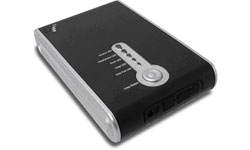 Santa Ana, CA - MediaGear announced availability of its new ImageBank OTG, a storage device with single push-button capability to store photos “On The Go” directly from a digital camera.
ImageBank OTG is a self-contained, “smart” portable mass storage backup solution. You never have to worry again about running out of flash memory to take digital photos. You can quickly copy and store your digital photos by simply plugging your digital camera into the ImageBank OTG. Just push the copy button and the ImageBank OTG stores your photos directly from your camera at speeds up to 6 MB per second, the company describes.
The ImageBank OTG operates like a computer when connecting mass storage devices to it. Its operation, ease of use, and one-button operation makes saving information from any mass storage device a breeze. With ImageBank OTG, you can connect to your computer as an external hard drive to store, edit or share data, or to any USB mass storage compliant device such as digital cameras, thumb drives and flash memory card readers and transfer that data up to 6MB per second. When not on the road, you can use ImageBank OTG as an external hard disk that connects easily via the USB 2.0 port to your computer.
The ImageBank OTG contains a large capacity lithium Ion battery that supplies enough power to keep the ImageBank OTG running for approximately 1.5 hours on its own, enough to store 20GB between charging. The ImageBank OTG can even power other devices through its High Speed USB 2.0 port, such as thumb drives and Flash Memory Reader/ Writers, and store the digital data from them at the touch of a single button.
ImageBank OTG is now available in 20GB, 40GB and 60GB sizes. Industry leading software for organizing digital photos is also included. ImageBank OTG is compatible with Microsoft XP, 2000, 98SE, and ME as well as with Mac OS 10.2.x, 10.1.2+, 9.2.x, and OS 9.1.x. Adobe Software Is available in the Windows version only.
For more information, visit
www.mymediagear.com
# # #
For a listing of all the Industry News Stories...
Click Here |



