Smart Edit 3.0 for Casablanca Introduced
November 07, 2003
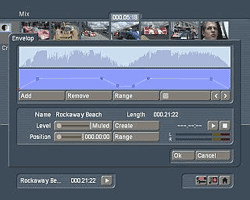 Boulder, CO - Smart Edit 3.0 for the Casablanca Kron, Prestige and Avio video editors has been unveiled by Macrosystem US, with Instant Scenes, RubberBanding Audio
and other new features and enhancements to the video editing system, including:
- Audio Rubberbanding (pictured) - a new tool to make audio changes, with a visual display of the wave-form that represents the changes in real time, making sound fades easier to achieve and control.
- Make global volume changes or add an effect to an entire audio track.
- Adjust audio levels on the fly while recording footage into Casablanca, even with DV.
- Import of music from CD has been simplified (only with units with DVD-Arabesk).
- A new audio effect "Surround" supports surround-sound (with a surround audio system)
- Timeline display has been expanded with more features.
- The scene function is now instantaneous, and real-time effects will need to be
created if included in a newly made scene.
- Add-on products such as demo versions can be deleted from the hard-drive.
- Keyboard map and interface language can be set to separate language versions.
- Used projects are marked in the project list.
- Timer controlled record: unit can be made to power up and down at specified times like a digital VCR.
- Time controlled record can be up to 3 hours long.
- Photo-record mode now creates flicker-free pictures (Avio Pro software needed for Avio units).
- Scene information can be accessed from the edit menu (length, current position, remaining length, date of recording and original time code of the source DV tape).
- Scene information includes a small text field for notes.
- System now works DV-direct only, so long waiting times are history. MPEG quality settings are not available any
longer with 3.0. For MPEG quality setting, use Version 2.4 OS.
- Short signal interruptions (dropouts) no longer stop recording DV.
- Supports hard-drives up to 120 GB (Prestige & Kron only).
- Direct access to other projects using the clipboard with PowerKey.
- Supports "Progressive" format ((30 full frames instead of 60 fields) for cameras with Progressive Scan capability.
The Smart Edit 3.0 User Manual and Release Notes are available as PDF downloads at the company's website. Upgrade and other special pricing offers are available.
Smart Edit 3.0 Upgrade from OS 1.x is only $299
Smart Edit 3.0 Upgrade from Smart Edit 2.0 is only $179
Casablanca Avio ST or
Classic Upgrade to Prestige
$2600
Casablanca Avio DV or
Classic w/DV Upgrade to Prestige
$2300
For more information, visit
www.casablanca.tv
# # #
For a listing of all the WEVA News Stories...
Click Here |



